



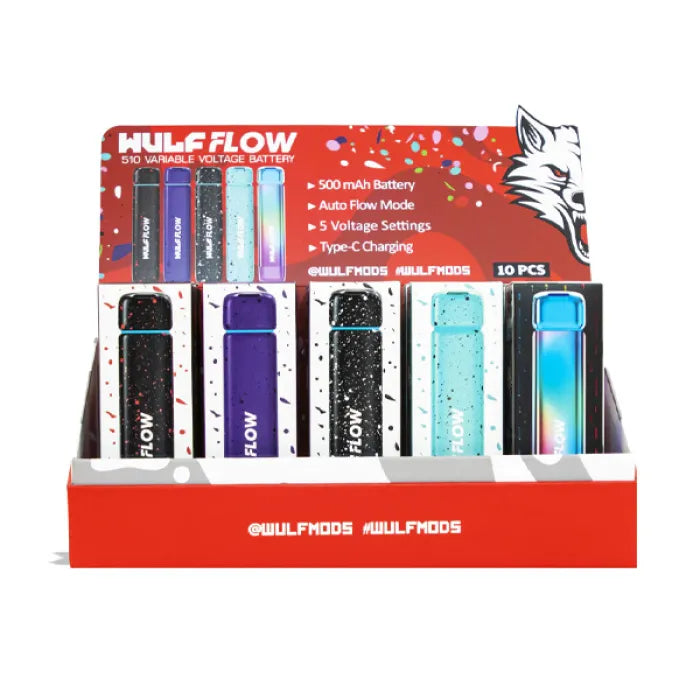


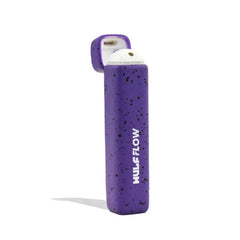


Wulf Auto Flow 510 Variable Voltage Battery - Assorted
- $18.99
- $18.99
- Unit price
- per
Subtotal:
$18.99
WULF AUTO FLOW 510 VARIABLE VOLTAGE BATTERY 10CT - ASSORTEDUnleash your clouds like never before with the...
Please hurry! Only 0 left in stock
Limited-Time Offers, End in:
151D
8H
23M
0S
10 customers are viewing this product
Couldn't load pickup availability
Free Shipping
Free standard shipping on orders over $99
Estimated to be delivered on 12/01/2022 - 15/10/2022.
Free Returns
Learn More.

Wulf Auto Flow 510 Variable Voltage Battery - Assorted
$18.99
Wulf Auto Flow 510 Variable Voltage Battery - Assorted
$18.99
Description
xWULF AUTO FLOW 510 VARIABLE VOLTAGE BATTERY 10CT - ASSORTED
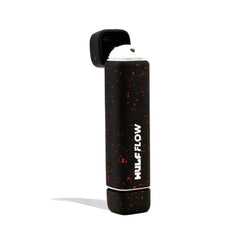
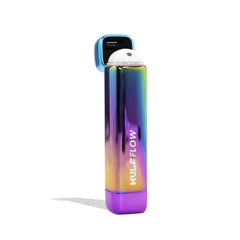
Unleash your clouds like never before with the Wulf Mods Flow Auto Flow 510 Voltage Battery! Use your Flow in traditional Auto Draw Mode or switch things up with Auto Flow Mode for a propulsive blast of silky vapor that is truly ferocious. The Flow has some serious claws thanks to its 500mAh battery, choice of 5 temperature settings (1.8, 2.4, 2.8, 3.4. 3.8), and ergonomic aluminum alloy body. With a completely concealed cartridge chamber the Flow is as sleek as it is discreet, making it the ultimate on the go option. The Flow is available in a selection of 5 different colors including pack favorites like black-red spatter and purple-black spatter.
Loading A Cartridge Into The Flow
To begin vaping with your Flow, you must first head into your collection of 510 threaded cartridges and choose one to get started with! From there remove the bottom of your Flow and gently attach the cartridge via the 510 threaded connection port. Once on, carefully replace the bottom of your Flow and prepare for vapor fun!
Using Your Flow
To turn on your Flow Auto Flow 510 Voltage Battery press the power button located on the bottom of the device 5x in a row. When input successfully, your Flow will shine its LED to let you know that you are good to go. After your session concludes, turn off your Flow by repeating the process and pressing your power button 5x in a row.
Using Your Flow In Auto Draw Mode
To use your Flow in auto draw mode, simply make sure that the cap is flipped down and then inhale from the mouthpiece. As the Flow is auto draw activated, all you have to do is draw and it will instantly provide you with some clouds. When you're done, just stop inhaling and the Flow will go back to stand by mode until you hit it again.
Using Your Flow In Auto Flow Mode
To use your Flow in auto flow mode, all you have to do is flip the mouthpiece up to reveal the Flow’s nozzle and it will immediately begin emitting vapor for a flow of milky vapor. The Flow will flow vapor for 10s before stopping. To set up another round simply gently close the Flow’s mouthpiece and then open it up again to start the 10s vapor flow once more.
Adjusting The Flow’s Temperature
To switch between the 5 different temperature settings on the Flow, press the power button on the bottom of the device 1x, this will cycle the voltage to the next level in line. To make viewing your voltage easy, each of the 5 temperature settings has a corresponding LED color, yellow - 1.8v, purple 2.4v, green - 2.8v, blue - 3.4v, and red 3.8v.
Pre-Heating Your Flow
Activate the Flow’s preheat mode by pressing the power button 2x in a row. When done correctly your Flow’s LED will come to life and start slowly cycling through the different colors to let you know your cartridge is being prepared. Once done, the LED’s will turn off and you will be ready to take a special pre heated blast from your Flow!
How To Charge The Flow
To charge your Flow make use of the USB-C port located on the bottom of the device. The first time you charge your Flow, make sure to leave it plugged in for 2 hours. Every single time after that first charge, never leave your Flow plugged in for longer than 1 hour at a time to avoid over charging and short circuiting.
Man holding Wulf Flow in front of purple studio background
Troubleshooting Your Flow
To make using your Flow as smooth as possible, we recommend that you are aware of the following troubleshooting warnings that can pop up on your device.
Over Time Warning: Your Flow will flash a red light 4x and switch to standby should you inhale from it longer than 10s at a time.
Short Circuit Warning: Your Flow will flash a red light 3x to let you know it is experiencing a short circuity, cease to use your device until this warning stops.
No Cart Warning: Your Flow will flash a white light 3 times if no cartridge is detected.
Overload Warning: Your Flow will flash a white light 5x to indicate an overload warning.
How To Clean the Flow
Clean your Flow Auto Flow 510 Voltage Battery by first disassembling the bottom and cartridge components, before making use of a q-tip or swab lightly dampened with isopropyl alcohol to gently scrub any build up or grime that has accumulated. Make sure to leave ample time for your Flow to dry before attempting to use it again.
Additional Information
xNam tempus turpis at metus scelerisque placerat nulla deumantos solicitud felis. Pellentesque diam dolor, elementum etos lobortis des mollis ut risus. Sedcus faucibus an sullamcorper mattis drostique des commodo pharetras loremos.Donec pretium egestas sapien et mollis. Pellentesque diam dolor cosmopolis etos lobortis.
- Comodous:
- Comodous in tempor ullamcorper miaculis
- Mattis laoreet:
- Pellentesque vitae neque mollis urna mattis laoreet.
- Divamus de ametos:
- Divamus sit amet purus justo.
- Molestie:
- Proin molestie egestas orci ac suscipit risus posuere loremous
Shipping & Return
xReturns Policy
You may return most new, unopened items within 30 days of delivery for a full refund. We'll also pay the return shipping costs if the return is a result of our error (you received an incorrect or defective item, etc.).
You should expect to receive your refund within four weeks of giving your package to the return shipper, however, in many cases you will receive a refund more quickly. This time period includes the transit time for us to receive your return from the shipper (5 to 10 business days), the time it takes us to process your return once we receive it (3 to 5 business days), and the time it takes your bank to process our refund request (5 to 10 business days).
If you need to return an item, simply login to your account, view the order using the "Complete Orders" link under the My Account menu and click the Return Item(s) button. We'll notify you via e-mail of your refund once we've received and processed the returned item.
Shipping
We can ship to virtually any address in the world. Note that there are restrictions on some products, and some products cannot be shipped to international destinations.
When you place an order, we will estimate shipping and delivery dates for you based on the availability of your items and the shipping options you choose. Depending on the shipping provider you choose, shipping date estimates may appear on the shipping quotes page.
Please also note that the shipping rates for many items we sell are weight-based. The weight of any such item can be found on its detail page. To reflect the policies of the shipping companies we use, all weights will be rounded up to the next full pound.
Custom Tab
x| Drostique | Nam tempus turpis at metus scelerisque placerat nulla deumantos |
| Pharetro Lorem | Pellentesque diam dolor elementum etos lobortis des mollis |
| Milancelos | Donec pretium egestas sapien et mollis |
| Pellentesque | Sedcus faucibus an sullamcorper mattis drostique des commodo pharetras |
| Proin Molestie | Pellentesque diam dolor elementum etos lobortis des mollis |
| Cosmopolis | Donec pretium egestas sapien et mollis |
Related Products
Recently Viewed Products
- Choosing a selection results in a full page refresh.